WordPress plugin
Arctic Download Monitor
Give every file a fixed download link that always delivers the newest version. Protect the files, decide who may download them, and see exactly what is downloaded, where and by whom.
Four jobs in one plugin
Store, protect, count and show
Store files
Versions with changelog and release date, a protected upload folder, and files in Amazon S3 or Google Drive.
Protect them
Access by role, passwords, e-mail before download, captcha, private links and download limits.
Count everything
A download log, statistics with countries and referrers, and e-mails and reports when files are downloaded.
Show them well
Buttons you design yourself, a countdown page, a document library, shortcodes, a block and an Elementor widget.
Get started
Up and running in four steps
After activation you find everything under Arctic Downloads in the WordPress admin menu. Every setting is explained in the guide.
Install
Go to Plugins → Add New → Upload Plugin, choose the zip file you downloaded and click Install Now.
Activate
Activate the plugin. It creates a protected folder for your files and a download link format such as /download/123/.
Add a download
Go to Arctic Downloads → Add download, give it a title and upload the file as the first version.
Share the link
Copy the download link or the shortcode from the editor, and put it on a page, in a button or in an e-mail.
Files and versions
One link, always the newest file
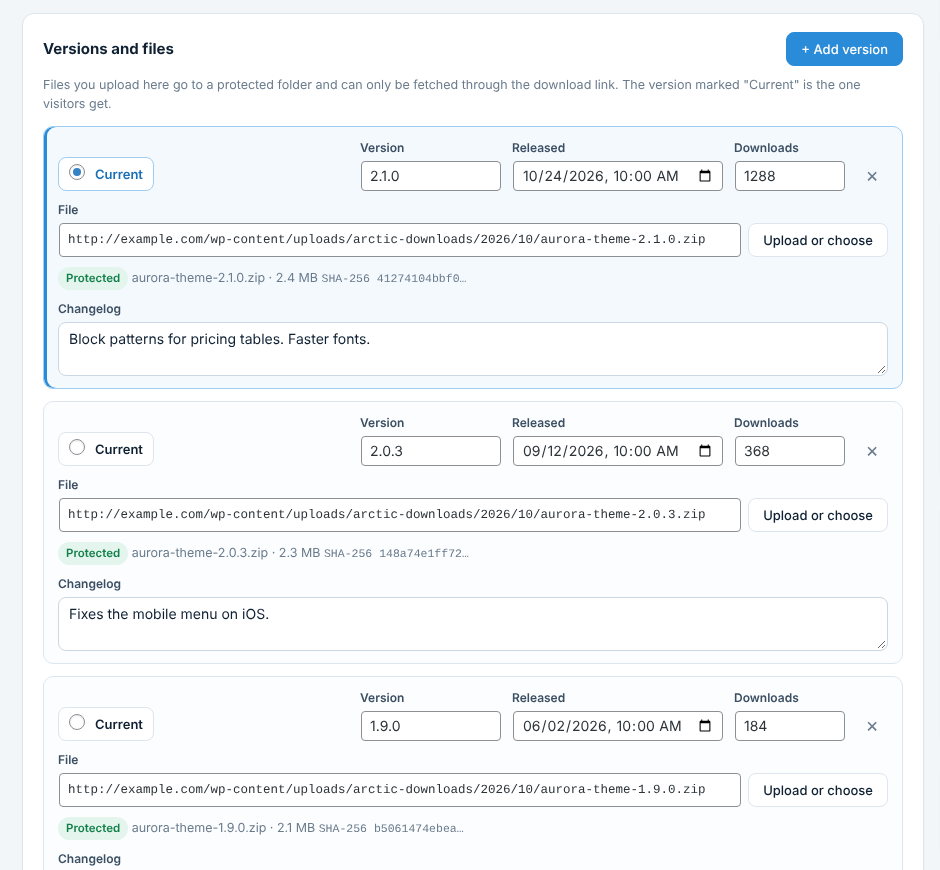
Upload a new version and every link, button and list on your site delivers it at once. Old versions stay available with their own counters.
Fixed download links
Every download gets a link such as /download/123/ or /download/my-plugin/ that never changes, whatever the file is called.
Versions and changelog
Each version has a version number, release date, changelog and its own counter. You mark which one visitors get.
Protected folder
Uploaded files go to a folder that cannot be opened directly. They are only delivered through the download link.
Fast delivery
PHP with resumable downloads works everywhere. On servers that support it, X-Sendfile or Nginx X-Accel-Redirect send large files.
Amazon S3 and others
Keep large files in a private bucket in Amazon S3, Cloudflare R2, DigitalOcean Spaces, Wasabi or Backblaze B2. Visitors get a signed link that works for a few minutes.
Google Drive
Deliver files that stay private in your Google Drive. Google Docs, Sheets and Slides are delivered as PDF.
Access and locks
Decide who gets the file
Every download can have its own rules, or use the defaults from the settings. Administrators and visitors with a private link always get through.
Who can download
Everyone, logged-in users or only the roles you choose. Others see a message or one of your own pages.
Password
One or more passwords per download, or shared passwords from the settings. A correct password is remembered for as long as you like.
E-mail before download
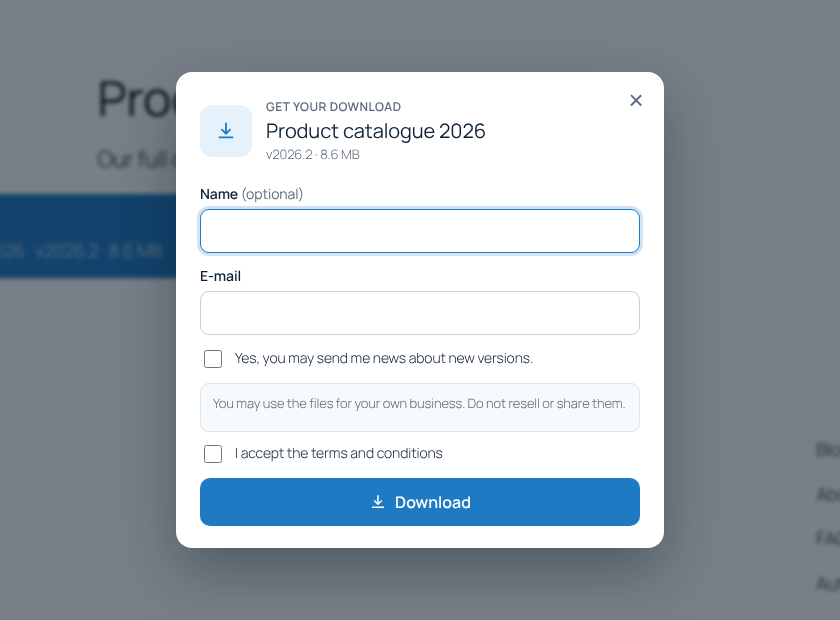
Ask for an e-mail address first. The file can start at once, or the link is sent to the address to prove it is real.
Terms and captcha
Ask visitors to accept your terms, and stop scripts with Cloudflare Turnstile or Google reCAPTCHA v2 or v3.
Form before download
Put a form from Contact Form 7, Gravity Forms, Ninja Forms or WPForms in front of a download. The file starts when the form is sent.
Private links and limits
Links for one person that expire after a number of days or uses, and limits per visitor, per role and per download.
Protection
Keep bots and leechers out
Hotlink protection
Other websites cannot link straight to your files. Websites you trust can be allowed.
Bad bots
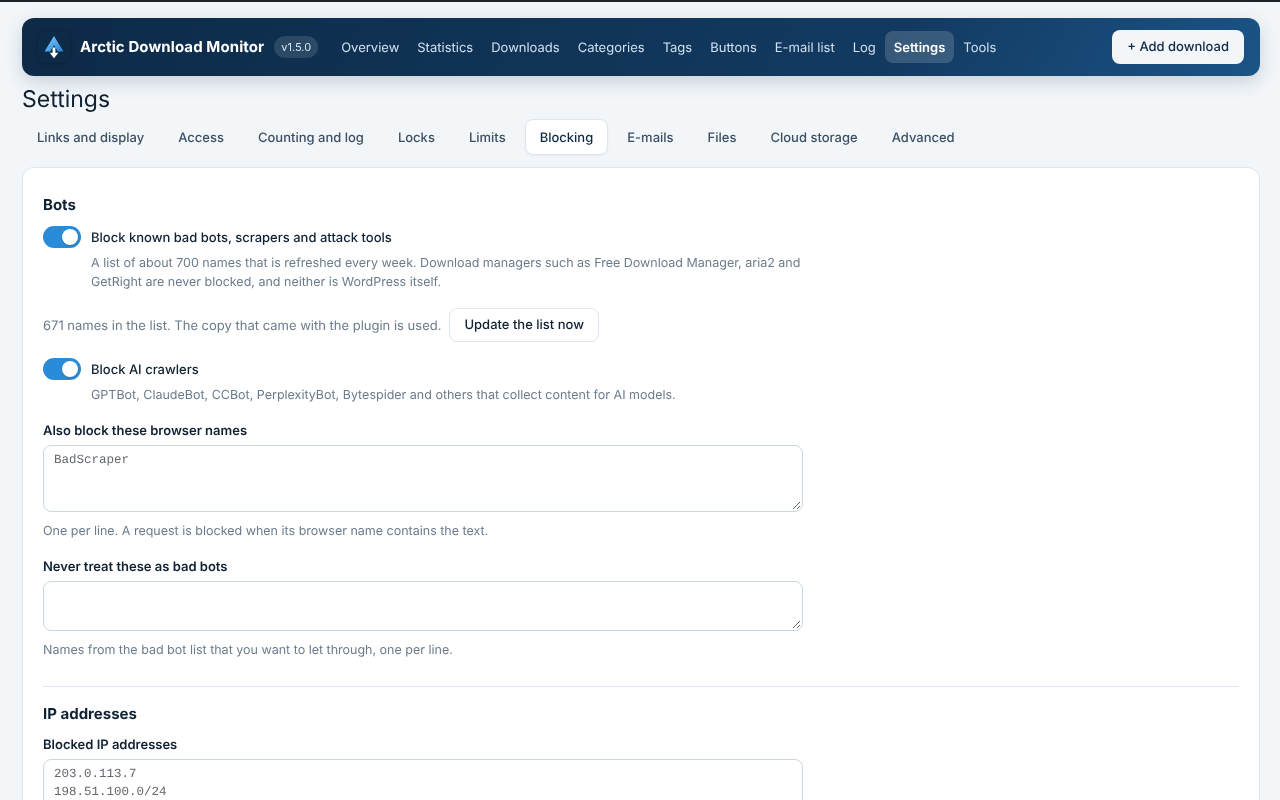
A list of about 700 known scrapers and attack tools, refreshed every week. Download managers are never blocked.
AI crawlers
Block GPTBot, ClaudeBot, CCBot, PerplexityBot, Bytespider and others that collect content for AI models.
IP blocking
Block single addresses, ranges such as 198.51.100.0/24, or from-to ranges. IPv6 works too.
Browser names
Refuse requests that do not say which browser they come from, and block browser names you choose.
Allowed folders
Files on your server are only delivered from folders you allow. PHP files and hidden files are never delivered.
Statistics
Know what is downloaded
The counters skip search engines, link previews, chosen roles and repeat downloads, so the numbers mean something.
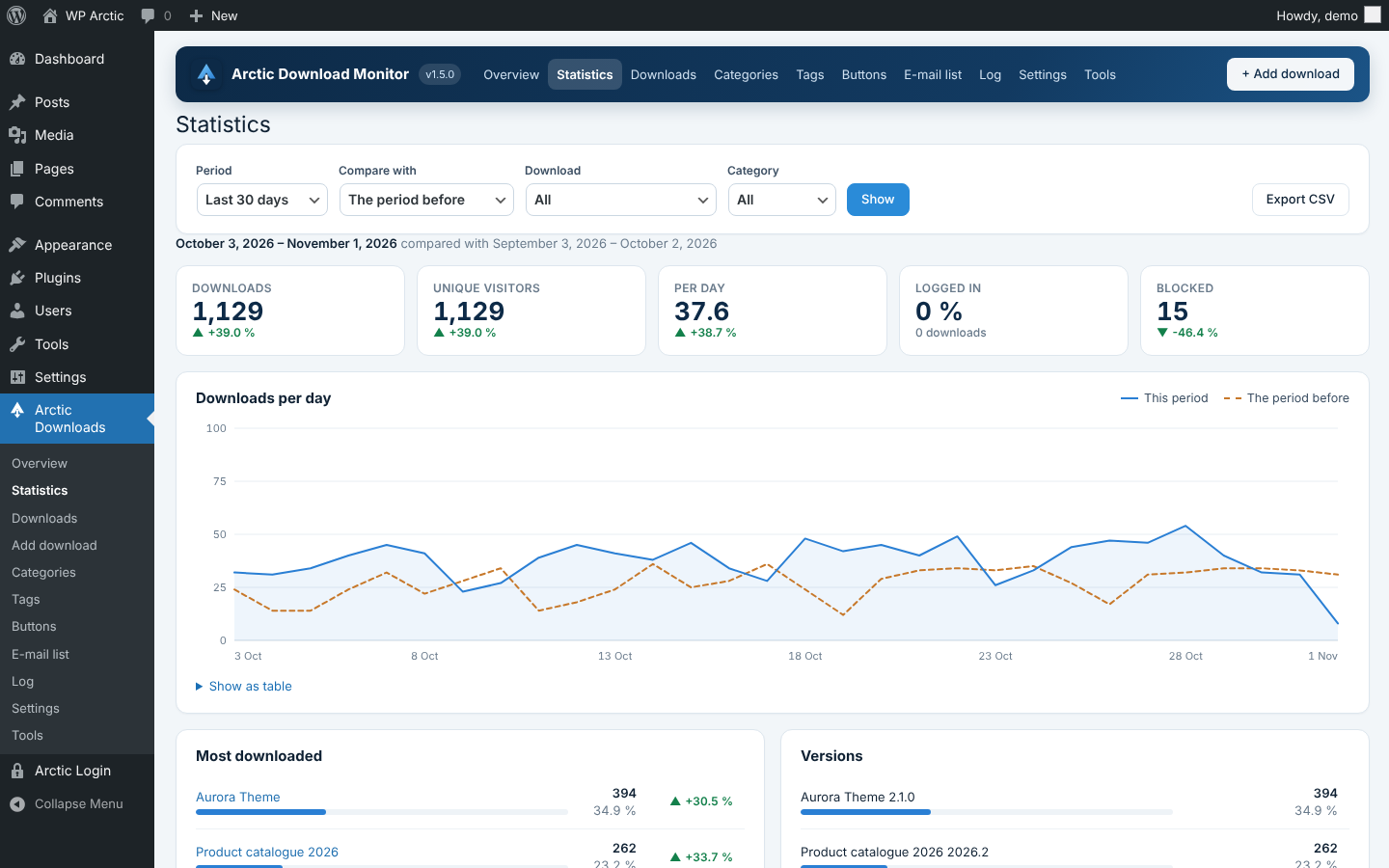
Overview
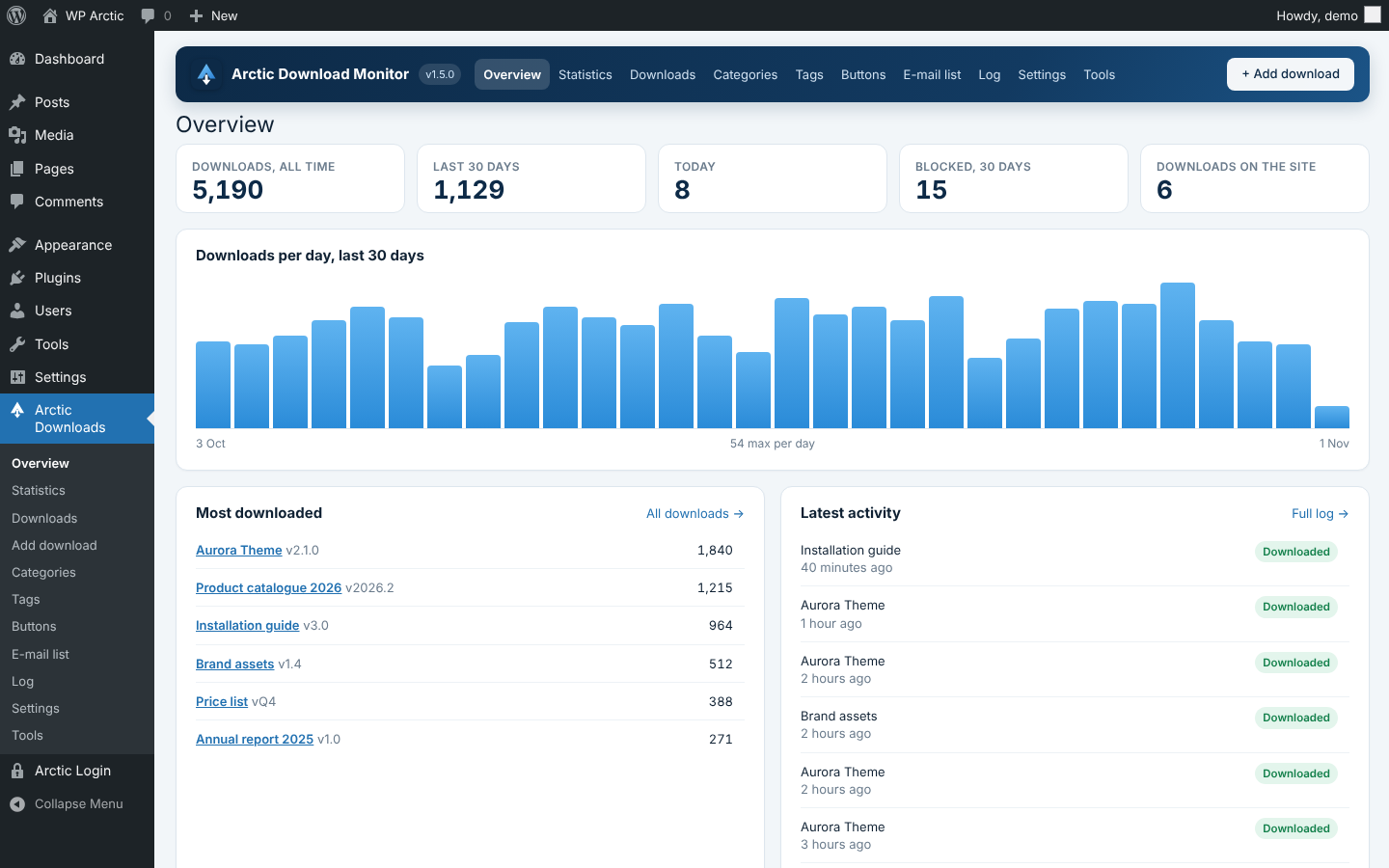
Downloads per day, the most downloaded files and the latest activity at a glance, plus a dashboard widget.
Statistics with comparison
Downloads, unique visitors, versions, countries, referrers, browsers, systems and users, compared with the period before.
Countries without sharing data
Countries come from the free DB-IP database on your own server. No IP addresses are sent anywhere.
Download log
Every download with filters and CSV export. IP addresses are shortened by default, as GDPR asks.
E-mails on download
Get an e-mail when a file is downloaded, for every download or only the ones you choose.
Reports
A daily, weekly or monthly report with downloads, visitors and blocked requests compared with the period before.
Display
Downloads that look like your site
Templates
Button, box, link, title, file name and version list. Copy a template to your theme to change it.
Button designer
Design your own download buttons with live preview and a contrast check, and use them anywhere.
Downloading page
A short countdown before the file starts, with a thank-you, a link to the guide or a donation button.
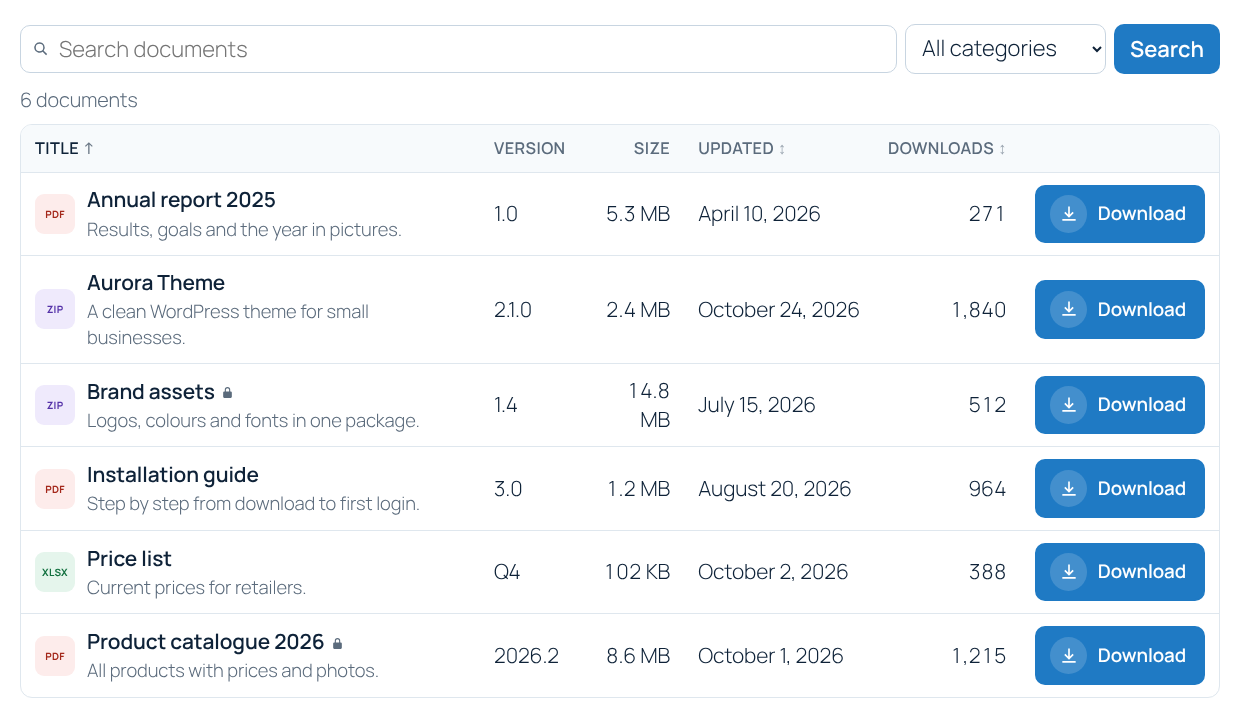
Document library
All downloads as a table, grid or list, with search, filters, sorting and pages.
Block and Elementor widget
An “Arctic Download” block for the block editor, and Elementor widgets for single downloads and the library.
Shortcodes
Show one download, a list, a single value such as the version or the count, or the whole library.
More
Small things that add up
E-mail list
Addresses from the e-mail lock are collected with consent text and date, with CSV export and WordPress’ personal data tools.
Mailchimp
Send addresses from the e-mail lock to a Mailchimp audience, with double opt-in, a newsletter checkbox and tags.
CSV import and export
Move downloads between sites, or add many at once, with column matching, a test run and updating of existing downloads.
Updates from wparctic.com
New versions show up on the Plugins and Updates screens, with “View details”, “Update now” and automatic updates.
File picker
Choose files in your S3 bucket or Google Drive straight from the download editor.
Clean uninstall
Choose whether downloads, the log and the settings are deleted with the plugin. Uploaded files are never deleted.
Your visitors' data stays on your server
IP addresses are shortened in the log by default, countries are found with a database on your own server, and the e-mail list works with WordPress’ export and erase tools. Outside services are only contacted for features you switch on.
Frequently asked questions
Yes. Export your downloads to a CSV file, and import it under Arctic Downloads → Tools. In the next step you match the columns, run a test, and import. Rows with the same title, slug or ID become versions of one download.
Links look like /download/123/. You can choose the word in the link and whether downloads are identified by number or by slug. Choose before you share links: changing the word later breaks links already shared.
Yes. A version can be an uploaded file, a file in Amazon S3 or an S3-compatible service, a file in Google Drive, or a web address on another server such as GitHub or a CDN. The download is counted and logged first either way.
Only for features you switch on: the country database is fetched from DB-IP, the bad bot list from GitHub, captchas talk to Cloudflare or Google, and Mailchimp, Amazon S3 and Google Drive are only contacted when you set them up. To find new versions, WordPress asks wparctic.com about twice a day; only the plugin name is sent, not your site’s address.
Contact Form 7, Gravity Forms, Ninja Forms and WPForms. Choose the form in the download editor. The file starts when the form has been sent; the form plugin’s own e-mails, spam protection and entries work as usual.
Many hosts do not deliver e-mail sent by PHP. Install an SMTP plugin such as WP Mail SMTP or FluentSMTP. Scheduled reports use WordPress’ own scheduler, which only runs when someone visits the site.
New versions show up on the Plugins and Updates screens in WordPress like any other update, with “View details”, “Update now” and automatic updates.
Requirements
- WordPress 6.0 or newer
- PHP 7.4 or newer
- Elementor, Contact Form 7, Gravity Forms, Ninja Forms or WPForms only if you want their features
Changelog
1.5.0 · 1 November 2026
Form before download with Contact Form 7, Gravity Forms, Ninja Forms or WPForms. Mailchimp for the e-mail lock. Updates from wparctic.com.
1.4.0
Amazon S3 and S3-compatible storage with signed links, Google Drive storage, and a Tools page with CSV export and import.
1.3.0
Button designer, downloading page with countdown, and the document library as a shortcode, block and Elementor widget.
1.2.0
Locks with password, e-mail, terms and captcha, private links with expiry and a maximum number of uses, download limits, and the e-mail list.
1.1.0
Statistics with period comparison, countries from DB-IP, e-mails and reports, and blocking of IP addresses, browser names, bad bots and AI crawlers.
1.0.0
First version.
Take control of your downloads
Install Arctic Download Monitor, add your first download, and share the link.